

As an ecommerce website developer or magento website developer, sometime we get the a situation when we forget the magento website admin access detail. To reset the password of any magento website is very simple. We just need to run a sql query. First you need to verify the database name. You can find out the database access detail from below file:
Magento Installation Directory/app/etc/local.xml
Open the file in any editor and you will get the following code
<connection>
<host><![CDATA[localhost]]></host>
<username><![CDATA[user_name]]></username>
<password><![CDATA[password]]></password>
<dbname><![CDATA[database_name]]></dbname>
Now you can access the database through phpmyadmin. Once you select the database, you just need to open sql tab and run the query:
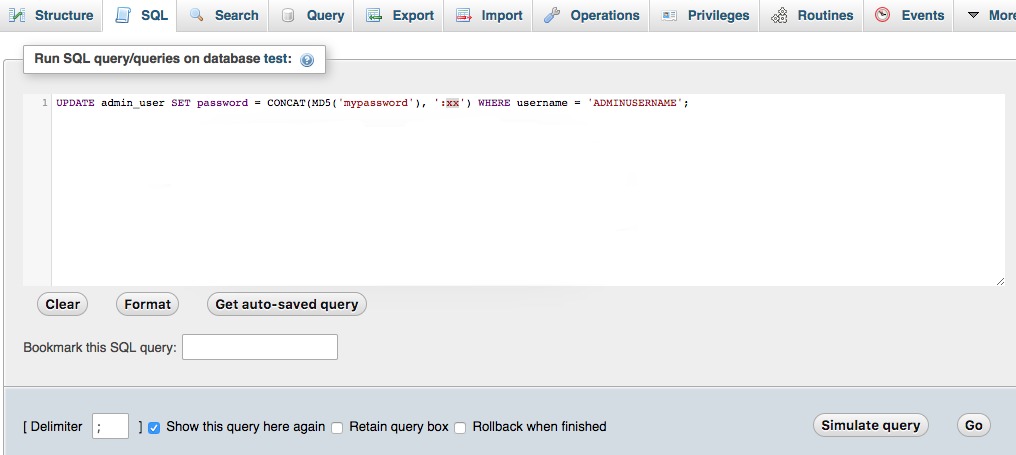
UPDATE admin_user SET password = CONCAT(MD5('mypassword'), ':xx') WHERE username = 'ADMINUSERNAME';
UPDATE admin_user SET password = CONCAT(SHA2('mypassword', 256), ':xxxxxxxx:1') WHERE username = 'ADMINUSERNAME';
*Note: You need to replace following:
mypassword = with your password
ADMINUSERNAME : your admin user name
xx or xxxxxxxx : any random string with same length.
Once you will finish above execution, you will be able to login magento admin with new password.
Thanks